Ресетване и основна конфигурация на Cisco Router 1841
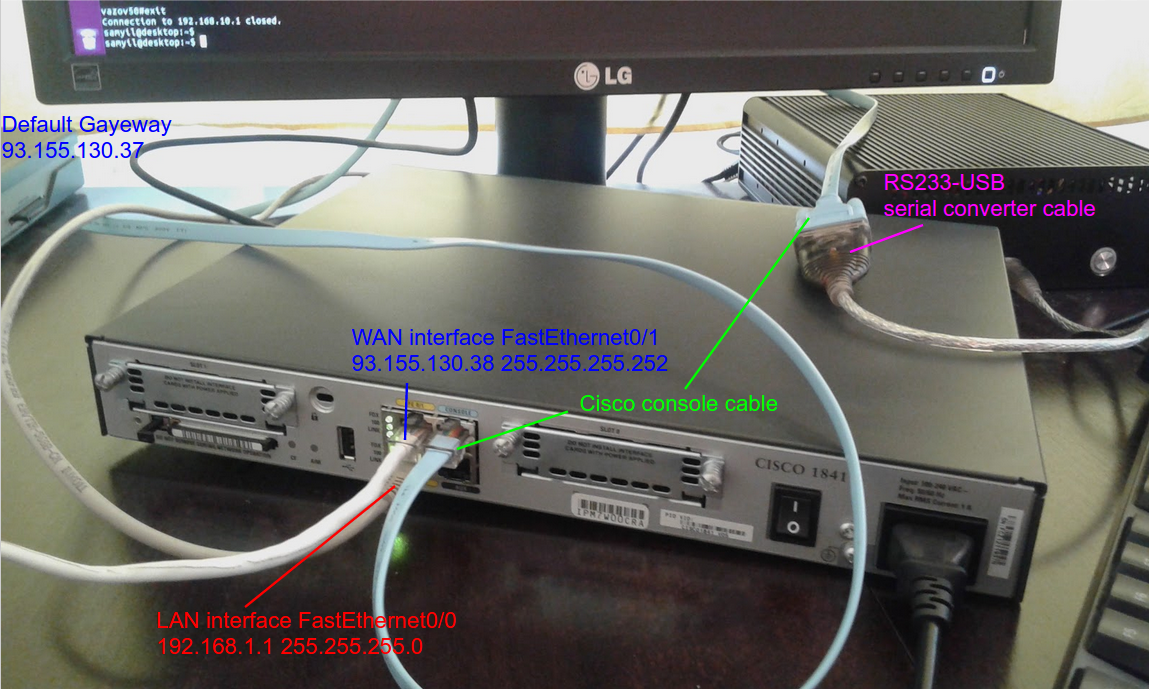
Ресетване на рутера
Свързваме се към конзолата със сериен кабел.
Изпълняваме в Убунту Линукс терминал:
sudo screen /dev/ttyUSB0 9000Рестартираме рутера с reload и натискаме CTRL+BREAK или CTRL+B докато зареждането спре в rommon.
rommon 1 >
rommon 2 > confreg 0x2142
You must reset or power cycle for new config to take effect
rommon 3 > reset
Рутера ще се рестартира и ще зареди до съветника за първоначална конфигурация (отказваме го с „no“)
Would you like to enter the initial configuration dialog? [yes/no]: noРутера ще продължи да зарежда след което изпълняваме:
Router>en
Router#config terminal
Enter configuration commands, one per line.  End with CNTL/Z.
Router(config)#config-register 0x2102
Router(config)#exit
Router#copy running-config startup-config
Destination filename [startup-config]?
Building configuration...
[OK]
Тук операция ресетване приключи. Остава ни да проверим с show running-config в enable режим текущата ни конфигурация.
Router#show running-config
Building configuration...

Current configuration : 520 bytes
!
version 12.4
service timestamps debug datetime msec
service timestamps log datetime msec
no service password-encryption
!
hostname Router
!
boot-start-marker
boot-end-marker
!
!
no aaa new-model
ip cef
!
!
!
!
!
!
!
!
interface FastEthernet0/0
 no ip address
 shutdown
 duplex auto
 speed auto
!
interface FastEthernet0/1
 no ip address
 shutdown
 duplex auto
 speed auto
!
ip forward-protocol nd
!
no ip http server
!
!
control-plane
!
!
line con 0
line aux 0
line vty 0 4
 login
!
scheduler allocate 20000 1000
end
Основна конфигурация
Router>en
Router#configure terminal
Enter configuration commands, one per line.  End with CNTL/Z.

Router(config)#enable password pass12345
Router(config)#username admin privilege 0 password 0 pass67890
Router(config)#aaa new-model

Router(config)#interface fastEthernet 0/1
Router(config-if)#ip address 93.155.130.38 255.255.255.252
Router(config-if)#no shutdown
Router(config-if)#exit

Router(config)#ip route 0.0.0.0 0.0.0.0 93.155.130.37

Router(config)#ip name-server 93.155.130.11
Router(config)#ip name-server 93.155.130.82

Router(config)#ntp update-calendar
Router(config)#ntp server 93.155.130.11
Router(config)#ntp server 93.155.130.82

Router(config)#clock timezone gmt 2 0
Router(config)#clock summer-time CDT recurring

Router(config)#hostname c1841
c1841(config)#ip domain-name itservice-bg.net

c1841(config)#interface fastEthernet 0/0
c1841(config-if)#ip address 192.168.1.1 255.255.255.0
c1841(config-if)#no shutdown
c1841(config-if)#exit

c1841(config)#ip dhcp pool 1
c1841(dhcp-config)#network 192.168.1.0 255.255.255.0
c1841(dhcp-config)#default-router 192.168.1.1
c1841(dhcp-config)#dns-server 93.155.130.11 93.155.130.82
c1841(dhcp-config)#exit

c1841(config)#interface fastEthernet 0/0
c1841(config-if)#description LAN
c1841(config-if)#ip nat inside
c1841(config-if)#exit

c1841(config)#interface fastEthernet 0/1
c1841(config-if)#description WAN
c1841(config-if)#ip nat outside
c1841(config-if)#exit

c1841(config)#access-list 1 permit 192.168.1.0 0.0.0.255
c1841(config)#ip nat inside source list 1 interface FastEthernet0/1 overload

c1841(config)#end
c1841#wr
Building configuration...
[OK]
Малко повече сигурност
Тъй като точно този рутер няма модул crypto тоест имейджа ми не е К9 не мога да използвам ssh за отдалечен достъп. Това ще става с telnet а аз не искам да рискувам. Затова ще добавя няколко правила за да е видим telnet само от локалната мрежа 192.168.1.0/24
c1841>en
Password:
c1841#configure terminal
Enter configuration commands, one per line.  End with CNTL/Z.
c1841(config)#access-list 100 permit tcp 192.168.1.0 0.0.0.255 any eq 23
c1841(config)#access-list 100 deny tcp any any eq 23
c1841(config)#access-list 100 permit ip any any
c1841(config)#interface fastEthernet 0/1
c1841(config-if)#ip access-group 100 in
c1841(config-if)#end
c1841#wr
Building configuration...
[OK]
c1841#
Статичен dhcp и пренасочване на порт към него
c1841>en
Password:
c1841#configure terminal
Enter configuration commands, one per line.  End with CNTL/Z.
c1841(config)#ip dhcp pool local_server
c1841(dhcp-config)#host 192.168.1.2 255.255.255.0
c1841(dhcp-config)#hardware-address d050.9959.458d
c1841(dhcp-config)#exit
c1841(config)#ip nat inside source static tcp 192.168.1.2 80 interface FastEthernet0/1 80
c1841(config)#end
c1841#wr
Building configuration...
[OK]
Този адрес ще има достъп само ако е с този мак
c1841>en
Password:
c1841#configure terminal
Enter configuration commands, one per line.  End with CNTL/Z.
c1841(config)#arp 192.168.1.2 d050.9959.458d arpa
c1841(config)#end
c1841#wr
Building configuration...
[OK]
Тези адреси няма да имат достъп
c1841>en
Password:
c1841#configure terminal
Enter configuration commands, one per line.  End with CNTL/Z.
c1841(config)#access-list 101 deny ip host 192.168.1.3 any
c1841(config)#access-list 101 deny ip host 192.168.1.5 any
c1841(config)#access-list 101 deny ip host 192.168.1.7 any
c1841(config)#access-list 101 permit ip any any
c1841(config)#interface fastEthernet 0/0
c1841(config-if)#ip access-group 101 in
c1841(config-if)#end
c1841#wr
Building configuration...
[OK]